Similar Photos Finder for iPhone
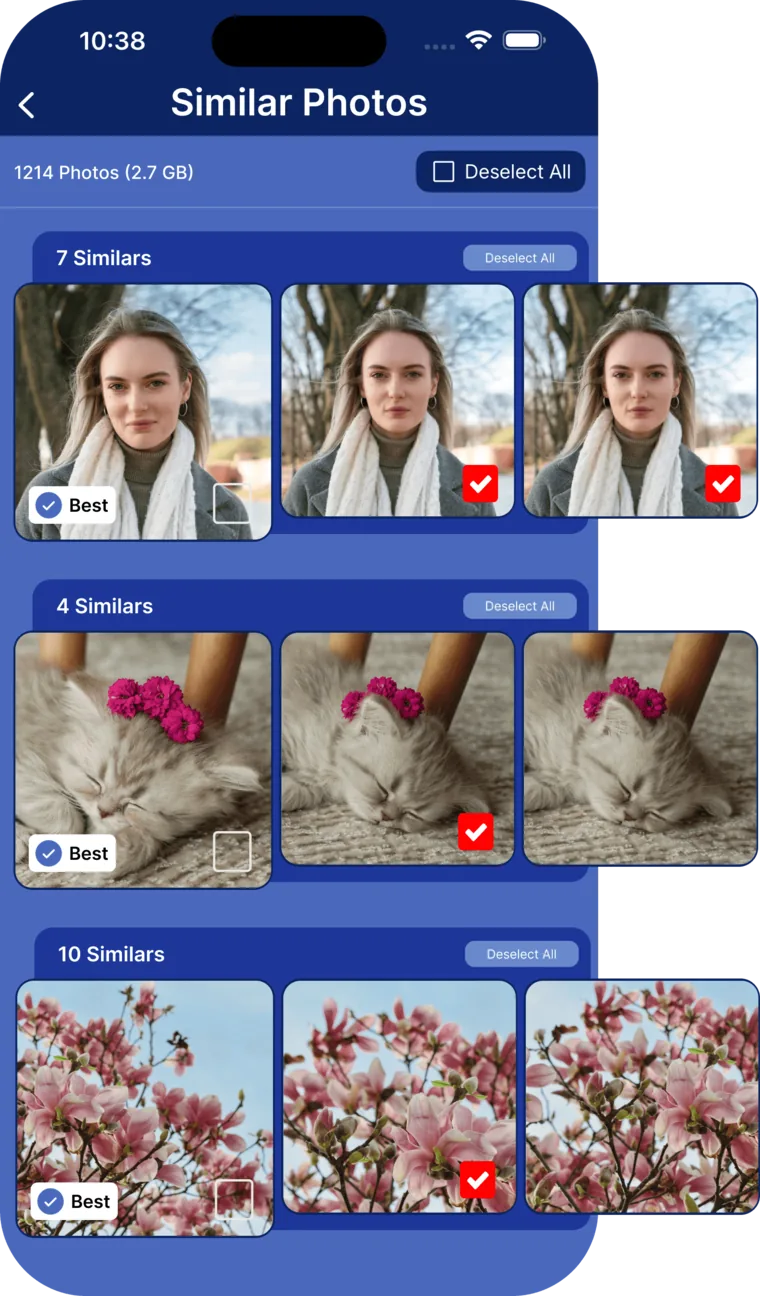
Ten shots of the same sunset, five attempts at the same group photo. Cleana groups similar pictures together, and its AI marks the sharpest, best-composed one so you can delete the rest with confidence.
- Groups near-identical shots of the same scene automatically
- AI ranks each group by sharpness, faces, lighting, and composition
- You always see the recommendation before anything is deleted

How the similar photos finder works
- 1. Scan: Cleana analyzes your library on-device and clusters photos taken of the same subject.
- 2. Rank: the AI scores every photo in a group for blur, exposure, closed eyes, and framing, then marks the best one with a checkmark.
- 3. Review: agree with the pick or choose a different keeper, group by group or with the swipe interface.
- 4. Clean: the leftovers move to Recently Deleted, recoverable for 30 days.
Why similar photos are harder to clean than duplicates
Exact copies are easy: they are identical files. Similar photos are trickier because every shot is slightly different, and choosing the keeper means comparing sharpness, expressions, and framing across five or ten frames. Done manually, that is hours of squinting at thumbnails.
Cleana's AI does that comparison in seconds. Curious how the ranking works? We break it down in how Cleana's AI selects the best photo.
Part of a complete photo cleanup
Similar shots are usually the single biggest source of wasted photo storage, 10GB or more on a typical iPhone. Pair this tool with the duplicate photo cleaner for exact copies and the video compressor for oversized videos, and most people reclaim 15 to 30GB in one session.
Everything runs on your device: no uploads, no account, no internet needed.
Frequently Asked Questions
How do I find similar photos on my iPhone?
The iPhone Photos app only finds exact duplicates. Cleana goes further: it scans your library on-device, groups visually similar shots of the same scene, and highlights the best one of each group so you can delete the rest.
How does the AI decide which photo is best?
It scores each photo in a group for sharpness, exposure, composition, and faces (including blinks and blur), then recommends the highest scoring shot. You can always override the recommendation.
Can I recover a photo if I delete the wrong one?
Yes. Everything Cleana removes goes to the Recently Deleted album in the Photos app, where it stays recoverable for 30 days.
Does the similar photos finder work offline?
Yes, completely. All AI analysis runs on your iPhone using on-device machine learning. Your photos never leave your device.
Similar photo guides from the blog
Keep the best shot, every time
Let AI pick the winner of every photo group. Works 100% offline, free to download.