Duplicate Photo Cleaner for iPhone
Cleana scans your entire photo library on-device, finds exact duplicates and near-identical copies of photos and videos, and removes them with one tap. No cloud, no uploads, no manual scrolling.
- Detects exact duplicates and near-identical copies of photos and videos
- Review every group before anything is deleted, nothing is removed automatically
- Typical result: 5 to 15GB freed on the first scan

How the duplicate photo cleaner works
- 1. Scan: open Cleana and let it index your photo library. Everything runs on your iPhone, so it works in airplane mode.
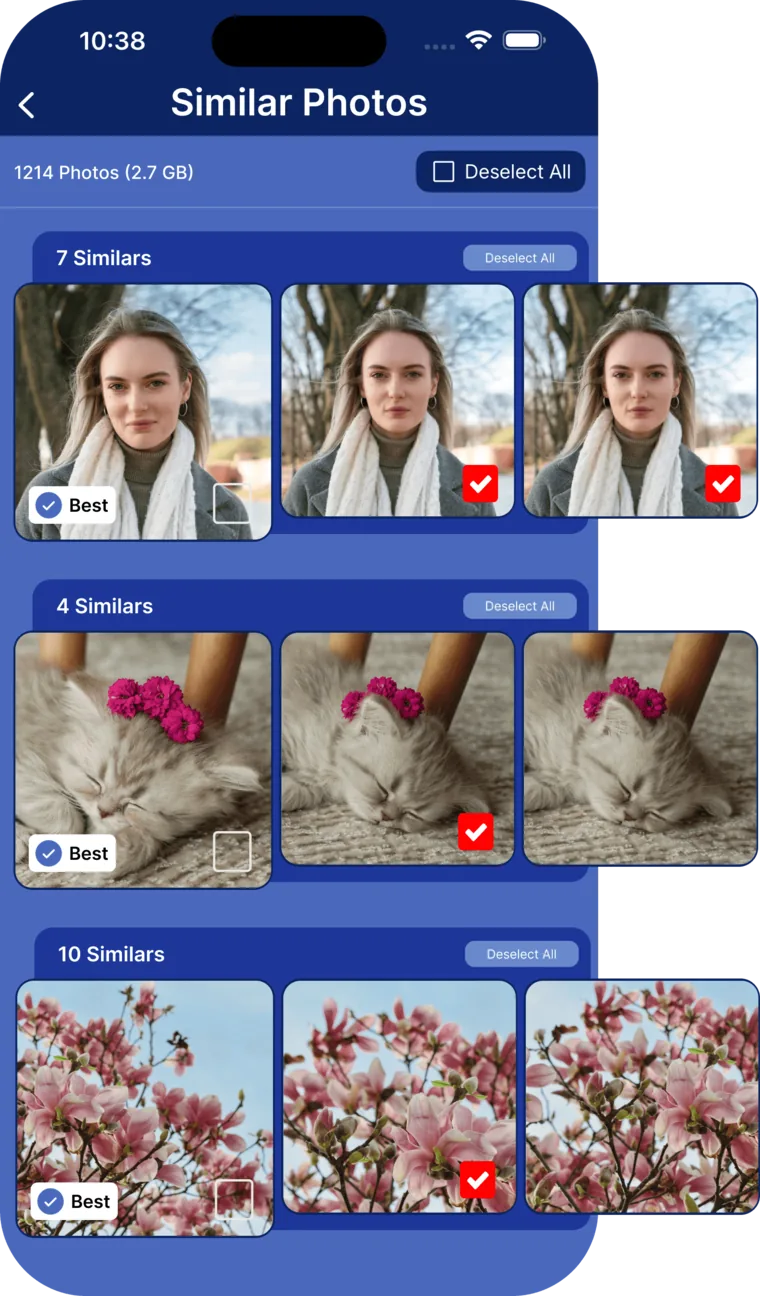
- 2. Group: exact copies and near-duplicates are clustered together, with the best version of each group pre-selected.
- 3. Review: check each group, change the selection if you disagree, and confirm.
- 4. Clean: removed photos go to Recently Deleted, so you have 30 days to change your mind.
Where do all these duplicate photos come from?
Duplicates accumulate quietly: burst mode fires 20 to 30 frames in seconds, photos get saved twice from Messages and WhatsApp, iCloud syncs and device transfers create copies, and edited exports sit next to their originals. The average iPhone carries 300 to 800 redundant photos, easily 10 to 20GB of wasted space.
Finding them by hand means scrolling through thousands of thumbnails and comparing them visually. That is exactly the kind of work AI should do for you.
Duplicate detection that never leaves your phone
Cleana compares photos using on-device machine learning, so your library is never uploaded to a server. Unlike cloud-based cleaners, there is no account, no sync, and no way for anyone else to see your photos. Read more about how Cleana protects your photo privacy.
Near-identical shots (same scene, slightly different frames) are handled by the similar photos finder, which picks the sharpest, best-composed shot of each group so you keep quality, not clutter. Prefer deciding photo by photo? Try the swipe cleaner.
Frequently Asked Questions
How do I delete duplicate photos on my iPhone?
Download Cleana, tap Scan, and review the duplicate groups it finds. The app pre-selects the best copy of each group; confirm and the rest are removed. Deleted photos stay in Recently Deleted for 30 days.
Will the duplicate cleaner delete photos without asking?
No. Cleana always shows you every duplicate group first. Nothing is deleted until you review and confirm the selection.
Does Cleana find near-duplicates or only exact copies?
Both. Exact byte-for-byte copies are grouped as duplicates, and visually similar shots of the same scene are grouped by the similar photos finder with the best version highlighted.
Is the duplicate photo cleaner free?
Cleana is free to download, and core duplicate detection and cleanup features are available to all users. Optional in-app purchases unlock premium features.
Duplicate photo guides from the blog
Delete duplicate photos today
Free up gigabytes in minutes. Works 100% offline, free to download.